Saturday, 11 February 2017

Gaming Bot

https://www.youtube.com/channel/UChly4t5cRKwreT1HwgILpZQ

Game videos

ideas

strategies

interactive


z

zz

y

yy

v

vv

x

xx

w

ww

u

uu

t

tt

s

ss

r

rr

q

qq

p

pp

o

oo

n

nn

m

mm

l

ll

k

kk

j

jj

i

ii

h

hh

g

gg

f

ff

e

ee

d

dd

c

cc

b

bb

a

aa

Wednesday, 8 February 2017

10 Amazing Things In Nature You Won’t Believe Actually Exist

Nature is beautiful and amazing. Nature creates wonders, sometime it’s really hard to believe that they are actually exist. In our daily life, we experience some crazy stuff that makes us to think about it. Like these amazing things in nature, it’s hard to believe in, but all these things are real and true.

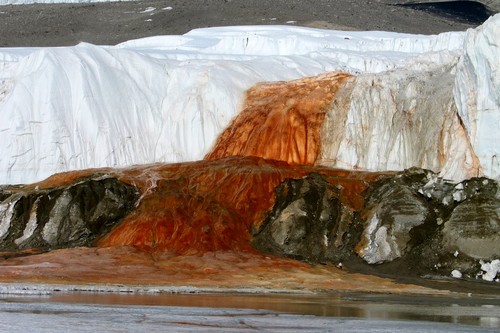
10. The Blood Falls in Antartica.

Blood Falls
Blood Falls is an outflow of an iron oxide-tainted plume of saltwater, flowing from the tongue of the Taylor Glacier onto the ice-covered surface of West Lake Bonney in the Taylor Valley of the McMurdo Dry Valleys in Victoria Land, East Antarctica.

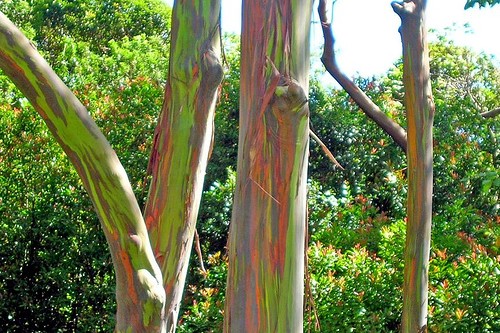
9. Rainbow Eucalyptus Trees in Kailua, Hawaii.

Amazing Things In Nature
Eucalyptus deglupta is a tall tree, commonly known as the rainbow eucalyptus. It is the only Eucalyptus species found naturally in New Britain, New Guinea, Ceram, Sulawesi and Mindanao. The unique multi-coloured bark is the most distinctive feature of the tree. Patches of outer bark are shed annually at different times, showing a bright green inner bark. This then darkens and matures to give blue, purple, orange and then maroon tones.

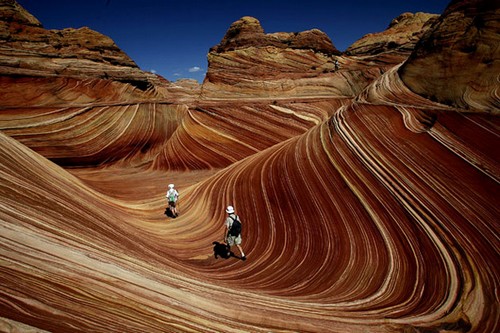
8. The Wave Arizona.

Wavw Arizona
The Wave is a sandstone formation on the slopes of the Coyote Buttes in the Paria Canyon-Vermilion Cliffs Wilderness, located in northern portion of the U.S. state of Arizona. The Beautiful sandstone formation is famous among hikers and photographers for its colorful, undulating forms, and the rugged.

7. Shimmering Shores of Vaadhoo, Maldives.

Shimmering Shores of Vaadhoo
Pinpricks of light on the shore seem to mirror stars, as seen in above picture taken on Vaadhoo Island in the Maldives. Glowing Blue Waves, the biological light, or bioluminescence, in the waves is the product of marine microbes called phytoplankton.

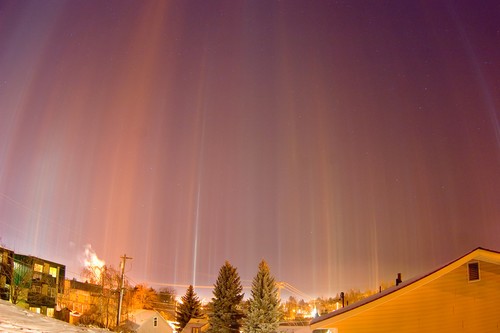
6. Light Pillars Over Moscow.

Light Pillars
It’s a visual phenomenon created by the reflection of light from ice crystals with near horizontal parallel planar surfaces. The light can come from the Sun, Moon or from terrestrial sources such as streetlights.

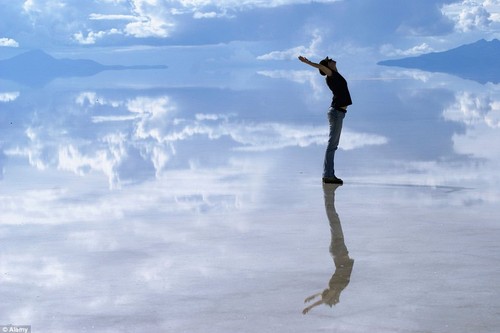
5. Reflective Salt Flats in Bolivia.

Reflective Salt Flats in Bolivi
Amazing salt flats where the sky and ground merge into one to create dreamy landscapes. Salar de Uyuni is the world’s largest salt flat at 10,582 square km. This is not water, the ground is covered in a layer of salt crust so reflective, it perfectly mirrors the sky. The Salar was formed as a result of transformations between several prehistoric lakes. It is covered by a few meters of salt crust, which has an extraordinary flatness with the average altitude variations within one meter over the entire area of the Salar.

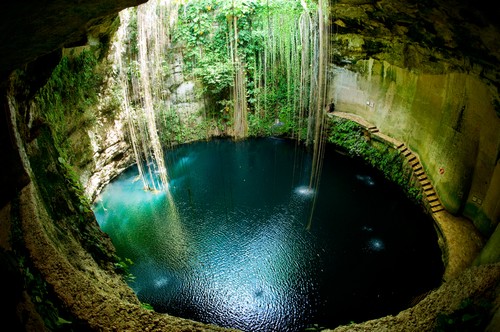
4. Cenote, Underground Natural Spring in Mexico.

Underground Natural Spring
Nature creates wonders, sometime its really hard to believe, this underground natural spring in Mexico is one of them. Known as Cenote, is a natural pit, or sinkhole resulting from the collapse of limestone bedrock that exposes groundwater underneath.

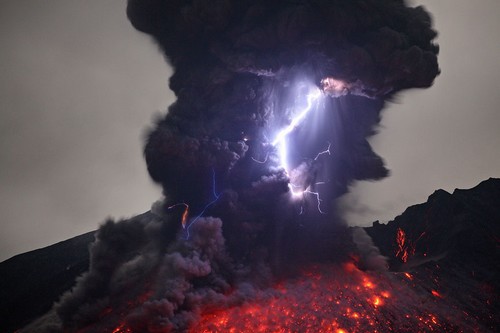
3. The Dirty Thunderstorm.

Dirty Thunderstorm
A dirty thunderstorm, also “Volcanic lightning” is a weather phenomenon that occurs when lightning is produced in a volcanic plume. A study indicated that electrical charges are generated when rock fragments, ash, and ice particles in a volcanic plume collide and produce static charges, just as ice particles collide in regular thunderstorms. Volcanic eruptions also release large amounts of water, which may help fuel these thunderstorms.

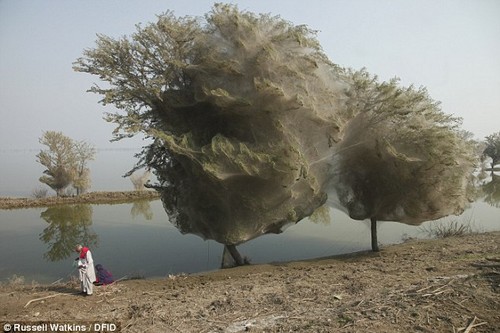
2. The Ghost Trees in Pakistan.

Ghost Trees in Pakistan
The eye-catching phenomenon is an unexpected side-effect of the flooding in parts of Pakistan. Millions of spiders climbed up into the trees to escape the rising flood waters, shrouding them with their silky webs. Because of the scale of the flooding and the fact that the water has taken so long to recede, many trees have become cocooned in ghostly spiders webs.

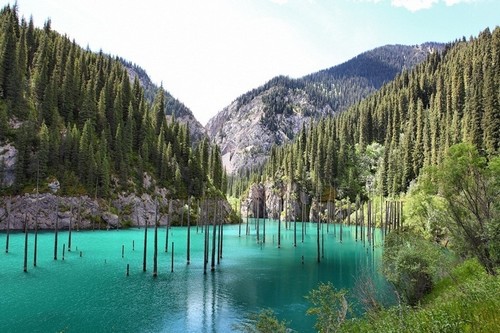
1. Underwater Forest in Kaindy Lake, Kazakhstan.

sunken forest
The sunken forest is part of a 400 meter long Lake Kaindy in Kazakhstan’s portion of the Tian Shan Mountains located 129 km from the city of Almaty. The lake was created as the result of an enormous limestone landslide, triggered by the 1911 Kebin earthquake.
10 Things You Need to Know About Camera Lenses
One of the biggest benefits of purchasing an SLR or compact system camera is the availability of multiple lenses. These lenses make it possible to achieve far more than the standard snapshot. From microscopic close-ups to creative fish-lens shots, each option has its own set of advantages, capable of producing a specific effect and adding to the artistry of a particular photo.
Nearly all new cameras that feature interchangeable lenses are of the digital single-lens reflex, or DSLR, variety. However, some smaller versions, known as compact system cameras, also feature removable lenses. Popular manufacturers of DSLR cameras include Pentax, Nikon, and Canon.


1. Kit Lens

Many introductory-level DSLR cameras come with a beginner's lens. These are sometimes referred to as "kit" lenses and generally provide only very basic zoom capability. Until quite recently, a kit lens was almost exclusively a simple lens, with little or no zoom. Now, some manufacturers have started to offer a slightly upgraded, low-end zoom lens with their entry-level DSLR cameras. When a camera comes with one of these lenses, its exact specifications are wholly dependent on the maker. Higher-end DSLR cameras often come without any lens, because it is assumed that the purchaser will already have a working knowledge of single-lens reflex camera and know the basics of lens purchases.


2. Telephoto Lens

telephoto lens features a long focal length and is capable of high magnification. Telephoto lenses are the ideal choice for individuals who plan to routinely take photographs in places where they will have to remain a certain distance from their subject at all times. For this reason they are popular amongst celebrity, sports, and wildlife photographers. Though the standard telephoto lens is not capable of an extreme close-up, it can be used to capture clear, high-quality shots at a moment's notice and from a far enough distance to suit most needs.


3. Macro Lens

Macro lenses are used for close-up photography involving small items, like flowers and bugs. These lenses are typically represented by a small flower-like symbol. They are capable of taking images at a 1:1 ratio and normally feature an exceptionally high level of optical quality. Some digital cameras feature an option that provides the right settings for shots similar to what the macro lens is capable of producing, but the quality is not going to be as high as it would be if the photographer were using a separate lens.


4. Zoom Lens

Zoom lenses are extremely common and highly beneficial. Most novice photographers will get the most value out of a high-end version of this lens type, since many are capable of obtaining several different levels of focal length from wide angle to zoom. The nature of an SLR camera makes it possible to visually see changes in depth, focus, and size through the viewfinder when taking a picture with a zoom lens. There are three main types of zoom lenses available for most cameras.
 

Type of Zoom

Description

Optical Zoom
Optical zoom lenses affect the amount of image that is actually falling on the camera's sensor. The result is a sharp final image.
Digital Zoom
Digital zoom is not capable of providing images of the same high quality of an optical zoom. It works by adding new pixels to a subject to digitally enhance its size. The result is an image that has far fewer unique pixels, and therefore does not appear as sharp.
Cropping Zoom
Cropping zoom works quite similarly to the way digital zoom does. However, instead of adding pixels to the center of an image to expand it, it uses some of the image sensors to record a duplicate. This is the same way that cropping works in photo-editing software.


6. Super-Zoom Lens

Super - zoom lenses combine the benefits of multiple lens types into one convenient-to-carry package. They are capable of producing ranges from standard to telephoto distance, as well as wide-angle shots in some cases. Though the quality is not as good in a super-zoom lens as it likely would be with separate lenses for each function, the advantage of not having to carry multiple lenses around for a single photo shoot is generally enough to merit their value. These are a good compromise for individuals who are still in the beginning stages of their photographic exploration and wish to acquire a range of zoom options with a modest investment.


7. Wide-Angle Lens

Wide - angle lenses offer the combination of a short focal length with a wide view. They are ideal for getting shots of buildings and landscapes, as well as any other image where you want a close foreground and a distant background to both be in focus. They are capable of magnifying the distance between two objects, or a subject and background, while allowing greater depth of field. Depth of field is a term used to describe the distance between the nearest and farthest thing in a scene; that is, it is a measure of which parts of an image are in focus.


8. Pancake Lens

Pancake lenses are especially slim in design, for added convenience. Many are small enough to fit inside a photographer's pocket. They are available not only for DSLR cameras, but also compact system cameras. They are generally capable of taking standard or slightly wide images. These lenses, which have been around in one form or another for more than 100 years, are also sometimes referred to as "short barrel" lenses.


9. Microscope Lens

More of an attachment than a lens, microscope lenses like the Nikon Fabre EX Stereoscopic are capable of taking detailed images with a magnification of up to 66x. This is great for nature photography, insect-shots, or simple exploration. The images produced range from truly beautiful to absolutely terrifying, but one thing's for sure, they are pretty amazing. This style of lens is often used to take remarkable pictures to enhance scientific articles and books.


10. Fish-Eye Lens

Popular fish - eye lenses distort image perception by magnifying the center of an image, while reducing size and clarity in surrounding areas. Generally these lenses are capable of producing a total 180, but some go as far as 220 degrees. First developed in the 1960s, they are named for the way a fish would view things from beneath the water.


Tips for the Beginner

Camera lenses are typically the most valuable and largest expense related to photography. Photographers should always take care of their lenses to the best of their ability. Remember to keep the lens capped whenever it is not in use, especially if you are shooting outside. Additionally, cameras and lenses should be stored away from extreme temperatures and dust. Moisture, humidity, and other natural elements can all wreak havoc on photographic equipment and increase wear and tear. On the other hand, well-cared for equipment may last a lifetime.
When it comes to selecting the first lenses for your bag, do so conservatively. Lenses are expensive and many people will get by just fine with the kit lens during the beginning stage. If you are an inexperienced photographer, it is ideal to start out with a camera that comes with a standard lens, and eventually move up to a high-quality zoom lens. Most photographers will next add a wide angle and telephoto lens to their collection. Macro, microscopic, and fish-eye lenses tend to be more popular with individuals who have a higher level of skill. They are not used as often with general photography and may not be used at all by a budding photog.


Finding Camera Lenses on eBay

To find a wide range of lenses, but new and used, visit the Lenses & Filters page on eBay. From within this section, you can narrow your results to include only a certain type of lens, as well as a specific brand, condition, or seller location.
In addition to browsing within the Lenses section for the perfect option, try searching for specific types using the search bar. This feature works best when you have a specific idea of what you wish to purchase. For example, you could type "Nikon EX' to get results for listings which contain only that particular make and model. To get even more exact results, try searching only within the Lenses & Filters section for a desired model.
Once you have found the lens that you wish to purchase, learn more about the seller by clicking on his or her username to visit the seller profile. From there, you can read reviews, see other items that the seller has available, and ask any questions that you may have.


Conclusion

Having a good selection of quality lenses on hand is key to producing creative, well-shot photographs. Nearly all professional photographers, and most students, will benefit from having a choice selection on hand. Switching out a lens can change the final outcome of a photograph more than nearly any other adjustment.
Though technology has greatly improved in recent decades, multi-functional lenses and standard digital cameras simply cannot produce the quality images that come from using the perfect individual lens for each desired shot. Anyone who has invested enough financially and interest-wise into photography to purchase a DSLR, or even a compact system camera, should learn more about the merits of specialty lenses and take the necessary steps to obtain the lenses they need for an enjoyable foray into photography.

op 10 Things to do When Your New Camera Arrives

TripodAtGoldenGate
I recently found myself in the position of having to buy a new camera. It is an exciting time, but the new camera will take some getting used to.
Once you have put the battery in, the lens on, and inserted the memory card, it’s time to make your camera your own. Here are some steps to do so:

#1 Set your diopter

If your camera has a viewfinder, there will be a tiny dial near the eye piece. This is called the diopter and it affects how you see through the lens. Be sure to set it for your eyes, or things might not appear sharp when you look through the viewfinder.
Diopter
Actually, if you’ve been shooting for a while and have never set your diopter, go ahead and do it now. You might be amazed at how much clearer things appear.

#2 Set your Modes

You already know to set your mode dial (get it out of Automatic), but there are some other modes to worry about.
First, set the Drive Mode to what you want. I suggest Continuous because it will allow you to bracket your photos, or just shoot rapidly. If you do it now, you won’t be in the field wondering why your camera is only taking one photo at a time.
Next, you will need to set your Metering Mode. This is the way the camera determines the proper exposure level. The camera can either use a large portion of the scene to measure the brightness level, or just one specific point. The choices you have are:
  • Automatic Mode: which is called Evaluative by Canon, Matrix by Nikon, and Multi-Segment by Sony
  • Partial Metering: where the camera uses the center portion of the scene to measure light
  • Spot Metering: where the camera meters using only one specific point (small area)
Any one of these modes is fine, just be sure to set the one you like best (Spot metering is more advanced so use with caution until you are up to speed with it).
Finally, set your Autofocus Mode, and by that I mean setting the focus points. You can either have the camera automatically select the focus points, or you can do it. If you do it yourself, set it so that the camera uses the center point to focus, it is the fastest and most accurate.

#3 Add your externals

Most of the time you will be adding a few things to your camera. Obvious items are the strap and the battery grip, if you have one. But another item you should add right away is the quick release plate for your tripod. That way, you won’t forget it, and you will also be able to put the camera on the tripod quickly when you are in the field.
Tripod-Plate
While we are on the subject of external items, this is probably a good time to make sure you have an intervalometer, or remote shutter release, that is compatible with your new camera. These things are very cheap these days, so go ahead and get one.

#4 Arrange Image Review

All cameras will show your picture on the LCD after you take it. The camera will not necessarily do it the way you want though. Here are the settings to check to make sure it is set up according to your preferences:
  • Length of time: In the camera’s menu, there will be an option to set the length of time your image appears. You might as well set this on its longest setting, as you can always click it away.
  • Orientation: If you shoot with your camera turned to a vertical orientation, sometimes the camera will turn the image on your LCD so it fits horizontally on the screen. The result is a tiny image, so you may want to turn this off (Note: this may be called “Auto Rotate” in some cameras).
  • Show Histogram: Definitely set your review so that it shows the histogram with the image review. That is the best way to make sure you have a proper exposure.
  • LCD brightness: Set your LCD brightness level to the highest level. Otherwise, when you are out in the sun you will have a very difficult time seeing the LCD at all.
While I am on the subject of the LCD, I want to mention one tricky little item for Canon shooters. On many Canon cameras, to use the Live View function, you have to go into the menu and enable it. I recently rented a Canon camera and actually thought it was broken because the Live View didn’t work. Turns out, I just needed to enable it!

#5 Set the Image Quality

The next setting to check is image quality. This is where you tell the camera what type of file to create.
Do I have to tell you that this setting should be Raw? No? Good. You might as well have the camera also create a JPEG while you are at it though. It won’t cost you anything but a small amount of memory.

#6 Create a Custom Menu

There are certain things you will only want to access sometimes, but you will want to get to them fast. Mirror Lock-up and Auto Bracketing come to mind for me. Fortunately, most cameras allow you to create a custom menu. That way you can add the features and settings you use the most, to one menu screen. That will save you a lot of time digging around in your camera’s menu.
Custom-Menu
My custom menu settings

#7 Set up Back Button Focus

Normally your camera will focus when you press the shutter button halfway down. That works okay, but the better way is to set your camera to instead focus when you press a button on the back of the camera. This way the focus will not automatically reset with each picture. The setting will be in your camera’s menu.

#8 Protect your gear

I suggest using a label maker to put a label with your name and phone number on each camera, lens, or other piece of equipment you own. We are all careful with our gear, but sometimes things move fast, and I know people that have inadvertently left lenses or other items behind. What are the odds that someone who finds something you left behind will actually call the number on the label to return the item? I don’t know. Maybe they are not high. But I do know that the odds of someone returning something with no ability to identify where it came from to be precisely zero percent.
You can also add some protection for your gear by registering it with Lenstag. It is a free service where you register your camera and/or lenses with them, then if your item is stolen they put the word out to help you recover it. Does it actually work? Mercifully I’ve never had anything stolen, so I don’t know. But it is free so you might as well try it.

#9 Set up the Wifi

Almost all new cameras have a Wifi feature these days. To take advantage of it, you will have to download an app to your phone and go through a set-up process. It’s best to sit down and do that right away so that when you are out and about you are ready to take advantage of the Wifi feature.
Wifi
Set up the connection between your camera and your phone to enable remote shooting and camera image viewing.

#10 Read the Manual

You knew this was coming, didn’t you? Yes, you need to read your camera manual. Yes, it can be tedious, but you’ll be glad you did.
Do you have any other tips to add for new camera owners? Please share in the comments below.

12 Things You Didn't Know Your DSLR Could Do

Your camera may be smarter than you think
Your digital SLR (even if it’s a budget “entry-level” model) is a picture-making powerhouse. And sure, you know all about the still and video capture, burst shooting, tracking autofocus, and smart metering.
But your camera likely has additional capabilities you may not know about—features that can improve your photos and make for a more enjoyable shooting experience. You may be surprised at the clever elves lurking in your camera body.
Now for our standard weasel words: Not every camera will have all of these tricks onboard, and older models will have fewer of them than newer models. The best way to find out the deep capabilities of your camera is to read the instruction manual—backwards. Some of the most interesting stuff gets buried in appendixes or custom-function tables in the back of the book. Also read the manuals for any software included with your DSLR: Some features end up there instead of the camera manual. Happy hunting!
1. Keep the horizon horizontal with an in-camera leveling guide.
Popular Photography
Dan Richards
When a perfectly level horizon line is crucial to the success of your landscape, or you don't want to take your eye off the viewfinder, or you handhold your camera, a built-in electronic level rules. The leveling guide on the Nikon D3s, shown here, can be super-imposed in live view.
Even experienced landscape photographers occasionally find their horizons tilting in shots, especially when the actual horizon is uneven to begin with. Ditto for architectural shots. And while you can always straighten things out later in image editing, you will lose some of the frame edges when doing so. Enter the in-camera level, which has a great advantage over tripod and hot-shoe levels: You can see the indicator in the viewfinder, allowing you to compose and level simultaneously.
Some cameras also have a level for the pitch axis (up/down tilt). This proves useful for squaring the camera with buildings or other structures, thus avoid keystoning (also called toppling perspective).
Tip: We’ve found in-camera levels particularly useful for handheld shooting. Photographers take plenty of landscape and cityscape pictures without a tripod, after all, and these are the shots that most often end up tilted—particularly the verticals. The in-camera level lets you get it right with very little fuss.
2. Go from RAW to cooked with in-the-camera processing.
You don’t need image-editing programs to process RAW files if you have one of the many DSLRs that allow RAW-to-JPEG conversion, with image editing, right in the camera. (Most current Canon, Nikon, Olympus, and Pentax models have this ability.) Before your conversion, you can make many standard image edits, such as white balance, highlight and shadow adjustment, saturation, contrast, cropping, JPEG profile, and so on.
Cameras increasingly allow for more elaborate fixes and modifications, too, such the miniature effect or perspective correction in shots of buildings. The great part is that the processing leaves the RAW file untouched, so you can make multiple versions of the same image.
Tip: Want to travel light for a day or weekend trip? Leave the notebook computer at home and take some extra memory cards. Shoot in RAW, and convert your favorite shots during down time or while on the plane/train/bus.
3. View your pictures remotely with tethered shooting.
Popular Photography
Dan Richards
The tidy tethering setup above uses the TetherTools Tether Table Aero System (www.tethertools.com), which can be bundled with the shown Manfrotto 131DDB Accessory Arm and Manfrotto 496RC2 Compact Ball Head for mounting on a single tripod or other stand.
Tethered shooting isn’t limited to high-end DSLRs. You can use a computer (or TV) for playback with any DSLR that has a video-out terminal, which is virtually all of them. Playback on a big screen is a boon for studio portrait shooting or tabletop still-life work—any static situation where detail is critical.
Even better, many current DSLRs (most Canons and Nikons, and Sony Alpha 700, 850, and 900 models) allow true tethered shooting: You operate the camera using the computer, which displays a live view on the screen. (Software for this is bundled with Canons and Sonys; Nikon shooters need Nikon Camera Control Pro 2, $145, street. Or try Adobe Lightroom 3 or Apple Aperture 3; both have built-in tethering for Canon and Nikon.)
Tip: With a long cable, you can use a tethered camera for wildlife shooting in your backyard.
4. Zap dust with software using dust mapping.
Yes, your sensor shakes to remove dust, and you carefully use a blower to loosen dust from the glass plate in front of the sensor, but you may still get persistent dust spots in your photos. Many cameras allow you to map the dust spots and rid your images of them later in software.
The mapping entails photographing a blank white surface; the manufacturer’s image-editing file uses the data to fill in the dust spots by interpolation.
Tip: Continue to exercise due diligence against dirt. Change lenses carefully, and never leave a camera body or rear lens element uncapped.
5. Get steadier long exposures with combined mirror lockup and self-timer.
Popular Photography
Dan Richards
The Mirror Up mode, shown here on the Nikon D4, is perfect for cutting down on camera shake when shooting a long exposure on a tripod.
Even on a tripod, your DSLR can shake due to mirror slap—the vibration caused when the mirror flips up and down—so you should lock the mirror up for long exposures. It can also shake if you trip the shutter with your hand on the camera, so you should fire with a remote or the self-timer. But did you know you could stop both shakes with one control? Mirror lockup with a 2-second delayed release is found on most DSLRs in a self-timer menu or drive-mode selection.
Tip: You can use the lockup/delayed release without a tripod. Rest the camera on a steady surface, or prop your elbows on a steady surface with the camera held firmly against your face. Take a breath, trip the shutter, and hold still until the mirror drops back down.
6. Perfect your optics with lens correction.
Readers of our lens tests know that there is no such thing as a perfect lens. Even top-notch optics can produce distortion, light falloff, and soft images at some apertures. A growing number of DSLRs have built-in fixes to correct for distortion (barrel and pincushion) and corner vignetting. Some can even counteract chromatic aberration, which robs images of sharpness and causes color fringing; in some cameras, this function is part of the RAW conversion menu.
Watch out: In some cases, this function works only with the camera maker’s own lenses, not with independent optics. **Tip: **The lens correction option may be the default setting in some cameras. If so, you can turn it off in a setup menu. Why would you? The distortion correction can cut off some of the frame edge—or you may just want the distortion.
7. Take notes without a notebook, by using voice memos.
Popular Photography
Dan Richards
What is a microphone doing on the back of the Canon EOS-1Ds Mark III, below? It allows the the shooter to add an audio clip to be attached to an individual frame.
This feature allows you to record a voice clip and embed it in the image file. It eliminates the need for a notepad or handheld device for recording the stuff that doesn’t get into the EXIF data: Names of people and places, how you got to the location, hair-raising happenings, etc. (While this capability is now limited to mostly higher-end DSLRs, we suspect it will eventually migrate downwards, as most DSLRs now have built-in mics for video recording.)
Tip Use the voice clip to record info for future reference: “Come back when mist is predicted” or “Get here early for the eastern light on the mountain.
8. Take a time-lapse sequence using the interval timer.
Curiously, you used to see on-board interval timers more often in compact cameras than in DSLRs, which usually required a separate controller to make the camera shoot automatically at regular intervals. But times are changing, and more and more DSLRs include built-in intervalometers.
Creating time-lapse videos from still shots is popular these days, and some cameras will even bundle shots into a video clip for you—no video editing software needed.
Tip:Make sure your camera’s battery is fully charged before making a long sequence, or consider using an AC adaptor.
9. Go wild and crazy (or, better yet, subtle and sophisticated) with filter effects.
Popular Photography
Dan Richards
This image was shot on the Pentax K-01 using its in-camera HDR mode, which combines 3 exposures.
We all know these imaging effects are in there, and yes, we have called some of them cheesy and over-the-top (witness the Pentax K-5’s cross-processing effect). But you know what? They’re fun, and can be useful, too. Filters such as fisheye effect and miniature effect can add zing to city scenes when you don’t have the right lens to do it for you; soft focus can help challenged complexions; pastel or watercolor effects can tone down harsh midday light. And remember, if you shoot RAW + JPEG, you’re not stuck with the rendition—it’s applied only to the JPEG.
Tip: Preview what a monochrome rendition will look like by setting JPEG capture to b&w, then use filters such as red, green, or yellow to alter tonality.
10. Try another kind of flash memory: TTL flash-exposure lock.
Just as cameras have an exposure lock setting that lets you set exposure for one area of the scene and then recompose, many DSLRs have flash-exposure lock. You should use it similarly: When a person or other important subject will be positioned at the edge of the frame, use the lock to preset flash exposure for the subject (it uses a preflash), then recompose.
Tip Flash exposure lock works with accessory TTL flash units—on- or off-camera—as well as the built-in unit.
11. Customize images with JPEG profiles.
Popular Photography
Dan Richards
The Picture Style menu found on the Canon 5D Mark II allows users to customize the look of their JPG images in-camera.
Every camera maker has a different term for them, such as Picture Styles (Canon) or Picture Controls (Nikon), with setting names such as Neutral or Vivid. But we call them JPEG profiles: the specific settings (saturation, sharpness, contrast, etc.) that the camera applies to a JPEG. You can tweak each parameter individually and save them as custom profiles. A few cameras even let you save a profile to a memory card, then transfer it to another camera.
Tip: Shoot only in RAW? The manufacturer’s conversion software bundled with the camera will usually allow you to apply a profile during processing on the computer.
12. Dig out shadow detail with dynamic-range extenders.
Again, camera makers have different names for them (Nikon: D-Lighting; Sony: D-Range optimizer) but the idea is the same: gain up the shadows without boosting the highlights. (This is separate from the HDR function found on some cameras.) As with many other picture adjustments, these shadow-highlight optimizers can also be applied later with the manufacturer’s RAW software.
Tip: Don't overdo it. We’ve found that some dynamic-range boosters,if applied excessively, can also increase noise in the shadows.